In short: Use Nginx + PHP-FPM for most modern sites, Apache when an application depends on
.htaccessrules, and OpenLiteSpeed for WordPress sites that use the LiteSpeed Cache plugin or need.htaccesswith low memory use. In AIO Panel, Nginx always stays in front, so you choose the backend per website and can switch at any time.
"Which web server is fastest?" has no single answer, because the web server is rarely the bottleneck. PHP, the database and caching decide most of a page's speed. What the web server does decide is compatibility: which configuration files your applications expect, which cache plugins work, and how much memory each site needs. This guide explains the three backends AIO Panel offers and when each one is the right choice.
How does AIO Panel run websites?
Every request first reaches Nginx. It terminates TLS, speaks HTTP/2 and HTTP/3, compresses with Brotli, serves static files, runs the page cache and the web application firewall. Then it hands PHP and dynamic requests to the backend chosen for that website.
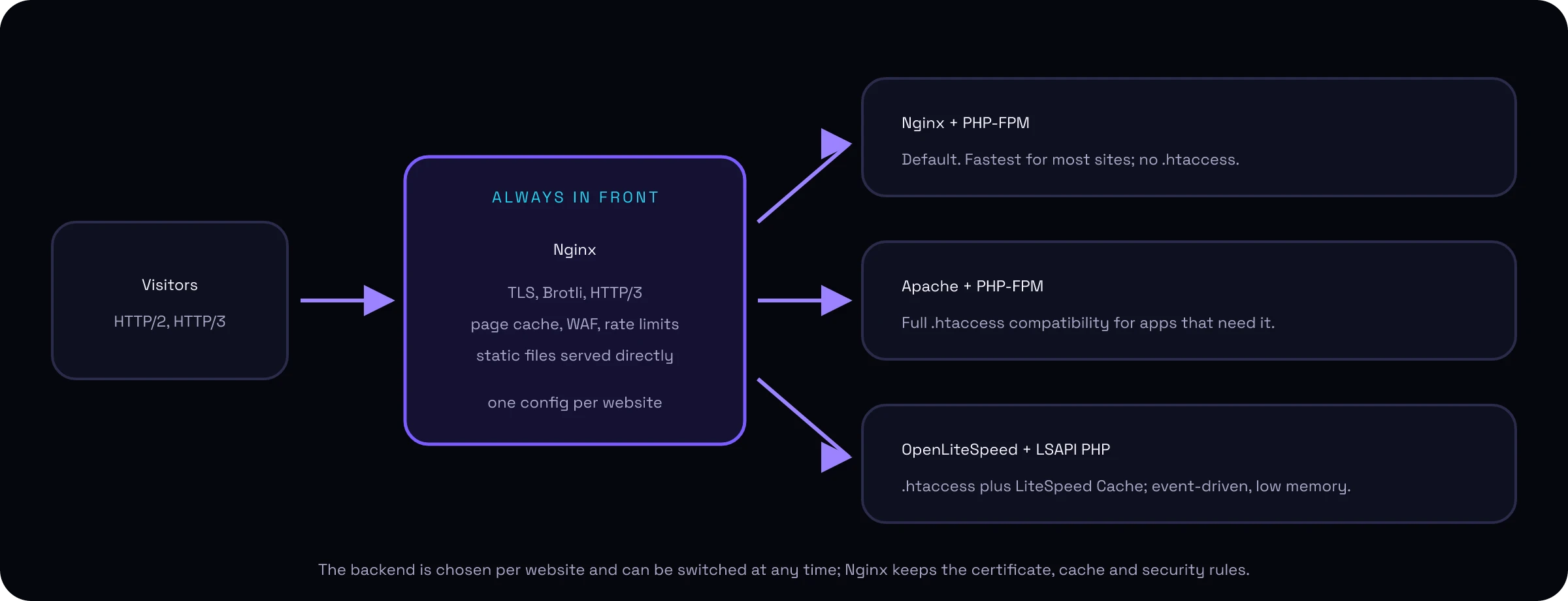
This hybrid layout means you never lose Nginx's strengths, whatever backend a site uses. Certificates, caching and security rules are configured once, in one place.
Nginx + PHP-FPM: the default
Nginx talks to PHP-FPM directly over a socket. There is no second web server in the path, so it is the leanest option.
- Best for: Laravel, Symfony, modern WordPress setups, and any application that does not rely on
.htaccess. - Watch out for:
.htaccessfiles are ignored. AIO Panel's importer converts the common cases (for example, apps deployed intopublic_htmlare served frompublic/), but custom rewrite rules must be translated.
Apache + PHP-FPM: full .htaccess compatibility
Nginx proxies requests to Apache, which reads .htaccess files and passes PHP to the site's PHP-FPM pool.
- Best for: applications that ship or generate
.htaccessrules, such as older CMSs, Magento 1-era code, and sites migrated from cPanel that depend on per-folder rules. - Watch out for: Apache adds a process per request in flight and uses more memory than the other two options.
OpenLiteSpeed + LSAPI: .htaccess with LiteSpeed Cache
OpenLiteSpeed is the open-source edition of LiteSpeed Web Server. It is event-driven like Nginx, reads .htaccess files like Apache, and runs PHP through LSAPI as the account's own user.
- Best for: WordPress sites that use the LiteSpeed Cache plugin, whose server-level cache and image optimisation only work on a LiteSpeed server, and sites that need
.htaccesswith lower memory use than Apache. - Watch out for: OpenLiteSpeed caches
.htaccessrewrite rules, so edits to them take effect after OpenLiteSpeed reloads (Services → OpenLiteSpeed → Reload). PHP comes from LiteSpeed's ownlsphpbuilds; a site whose exact PHP version is not available runs on the closest installed one, and the website details say so.
Which web server should I choose?
| Your situation | Choose |
|---|---|
| New site, framework app, API | Nginx + PHP-FPM |
| WordPress with your own caching (Redis, page cache) | Nginx + PHP-FPM |
| WordPress with the LiteSpeed Cache plugin | OpenLiteSpeed |
App that relies on .htaccess rewrite and access rules |
Apache, or OpenLiteSpeed for lower memory |
Migrated cPanel site that breaks without .htaccess |
Apache first, then test OpenLiteSpeed |
| Static site or reverse proxy to Node.js, Python or Docker | Static or Proxy mode (no PHP backend) |
If you are unsure, start with Nginx + PHP-FPM. Because the backend is a per-site setting, you can switch a single site to Apache or OpenLiteSpeed in a minute and compare.
How do I add OpenLiteSpeed to AIO Panel?
- On a new server: run the installer with
--openlitespeed. - On a running server (version 0.3.19 or later): open Services, find OpenLiteSpeed and click Install. The panel adds LiteSpeed's signed package repository, installs
lsphpfor each PHP version on the server, writes its configuration and checks it before starting.
Then open a website's settings, choose OpenLiteSpeed (via Nginx) as the stack and save. OpenLiteSpeed listens only on 127.0.0.1, so it is never exposed to the internet directly.
Does the backend change my security or SSL setup?
No. Certificates, HTTP/3, Brotli, the page cache, the WAF and rate limits all live in the Nginx layer and work the same for every backend. Each backend runs PHP as the website owner's user, so accounts stay isolated from each other.
FAQ
Is OpenLiteSpeed faster than Nginx?
For PHP sites, the difference between the two web servers is small compared with the effect of caching. OpenLiteSpeed's real advantage is the LiteSpeed Cache plugin for WordPress, which needs a LiteSpeed server for its server-level page cache.
Does Nginx support .htaccess?
No. Nginx does not read .htaccess files. In AIO Panel, choose Apache or OpenLiteSpeed as the backend for sites that depend on them, while Nginx keeps handling TLS and static files in front.
Can I use different web servers for different sites on one server?
Yes. In AIO Panel the backend is a per-website setting, so one server can run Nginx, Apache and OpenLiteSpeed sites side by side behind the same Nginx front end.
Is OpenLiteSpeed free?
Yes. OpenLiteSpeed is open source under the GPLv3. AIO Panel installs it from LiteSpeed's official repository at no extra cost.