In short: AIO Panel now imports Plesk and DirectAdmin backups, runs websites on OpenLiteSpeed behind Nginx, gives every hosting account S3-compatible object storage, and loads up to four times less data thanks to HTTP/2 and Brotli. Update from Settings → Updates or run
aio updateas root.
November was the biggest month for AIO Panel since launch. Ten releases (0.3.10 to 0.3.19) closed four items from the public roadmap, made the panel noticeably faster, and added new tools on aiopanel.net. This post walks through everything that changed and what it means for your servers.
What is new in AIO Panel 0.3.10 to 0.3.19?
| Area | What changed | Where to find it |
|---|---|---|
| Migration | Plesk and DirectAdmin backups can be imported | Migration → Other control panels |
| Web servers | OpenLiteSpeed as a per-site backend behind Nginx | Website stack picker, Services → Install |
| Storage | S3-compatible buckets and access keys per account | Object Storage |
| Speed | HTTP/2, Brotli-precompressed assets, preloaded fonts | Automatic after updating |
| Licensing | Lifetime licenses show "Lifetime" instead of a date | Settings → License |
| aiopanel.net | Redeem codes, a Modules download page, a live demo | Account → Licenses, /modules, /demo |
Can AIO Panel import Plesk and DirectAdmin accounts?
Yes. Open Migration, choose Other control panels, and upload the backup:
- Plesk (Obsidian and Onyx): a whole-subscription backup from Backup Manager. The panel recreates domains, subdomains and aliases with their files, MySQL databases with users and passwords, mailboxes with every message, forwarders, catch-all addresses, DNS zones and scheduled tasks.
- DirectAdmin: the
user.<creator>.<user>.tar.gzfile from Admin Backup/Transfer, Reseller Backups or the user's own Site Backup. Domains, subdomains, pointers, databases, mailboxes, forwarders, catch-all, DNS and cron jobs come across.
As with cPanel imports, nothing is written until you have reviewed the analysis. The review lists everything the backup does not contain, for example SSL certificates (AutoSSL issues new ones once DNS points to the new server). The full list per panel is in the migration guide.
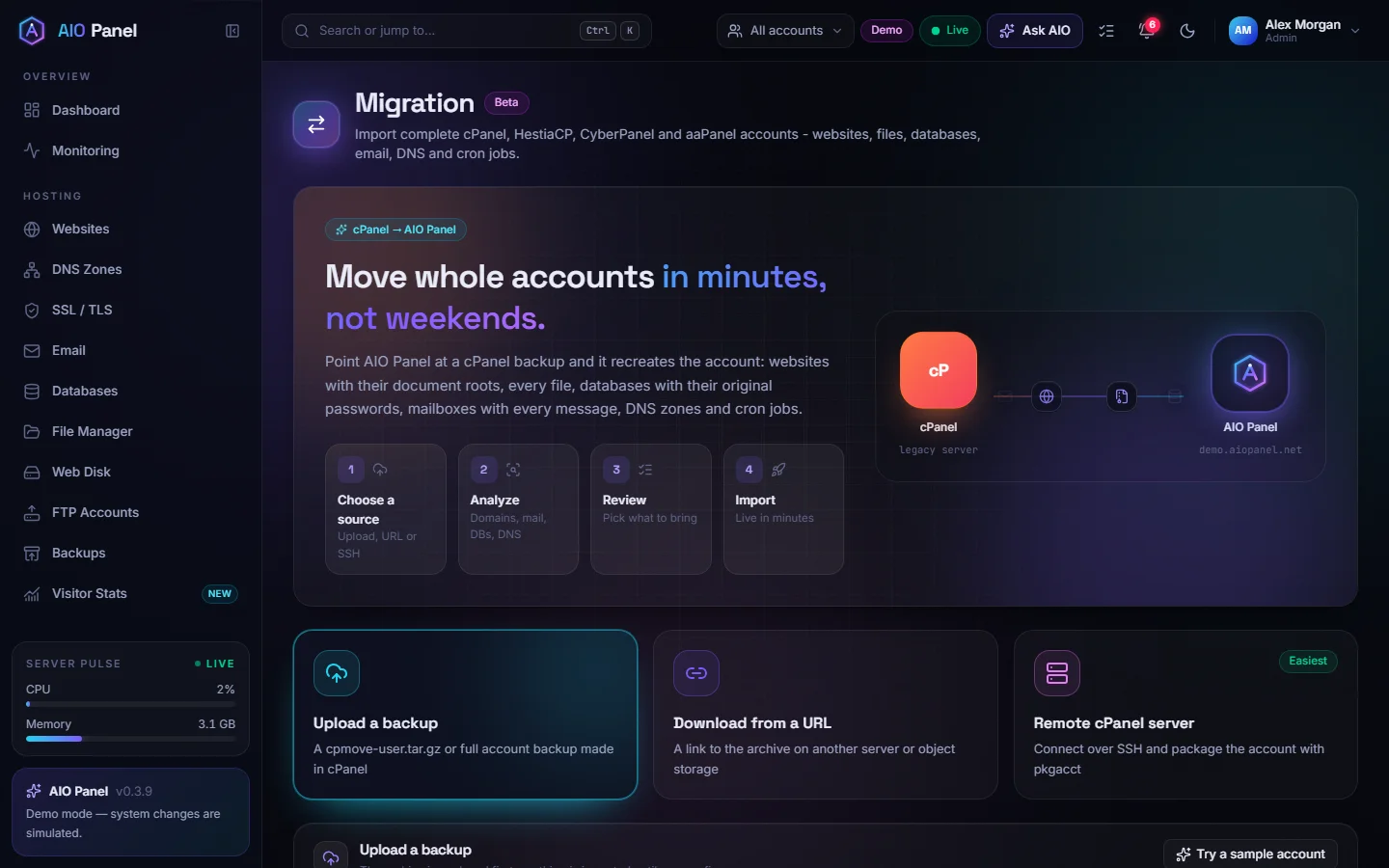
AIO Panel now imports from six panels: cPanel, Plesk, DirectAdmin, HestiaCP, CyberPanel and aaPanel. If you are planning a move, our step-by-step cPanel migration guide covers DNS, mail and the checks to do before you switch.
How does OpenLiteSpeed work in AIO Panel?
OpenLiteSpeed joins Nginx + PHP-FPM and Apache as a third website backend. Nginx always stays in front and keeps TLS, HTTP/3, the page cache, the WAF and static files. OpenLiteSpeed runs PHP through LSAPI as the account's own user, reads .htaccess files and works with the LiteSpeed Cache plugin for WordPress.
You choose the backend per website, can switch at any time, and can pick it for imported sites on the migration review. To add OpenLiteSpeed to an existing server, open Services, find OpenLiteSpeed and click Install. Version 0.3.19 adds LiteSpeed's signed package repository automatically, installs a matching lsphp build for every PHP version on the server and keeps OpenLiteSpeed on the loopback address. On a new server, pass --openlitespeed to the installer.
If an earlier OpenLiteSpeed install stopped with an error, update to 0.3.19 and open Services: the OpenLiteSpeed card now shows Finish setup, which completes the configuration without reinstalling anything.
Not sure which backend to choose? Read OpenLiteSpeed vs Nginx vs Apache.
What is AIO Panel object storage?
Every hosting account can now create S3-compatible buckets on the server itself, served by MinIO:
- Buckets are named
<account>-<name>, so names never clash between customers. - Quotas are hard limits enforced by the storage server.
- Public downloads can be switched on per bucket; uploads always need a key.
- Access keys are scoped to the account's own buckets and come with ready-made rclone and AWS CLI settings.
It works with WordPress media-offload plugins, Laravel's S3 driver, rclone, s3cmd and anything else that speaks S3. Install the component with --object-storage, or rerun the installer with that flag. Details are in the object storage guide.
How much faster is the panel?
We measured before changing anything. The server answered in milliseconds; the time went into the number of bytes and connections. So 0.3.11 changes how the panel is delivered:
| Measurement | 0.3.10 | 0.3.11 |
|---|---|---|
| Main panel script on the wire | 715 KB | 184 KB (Brotli) |
| Protocol | HTTP/1.1, six connections | HTTP/2, one multiplexed connection |
| Theme script | separate blocking request | inlined, allowed by a CSP hash |
| Fonts | found after the stylesheet | preloaded with the page |
HTTP/1.1 is still available for terminals and other WebSockets, and AIO_HTTP2=0 turns HTTP/2 off if a proxy in front of the panel needs that. aiopanel.net got the same treatment plus per-page bundles: a first visit now downloads 191 KB of script instead of 309 KB.
What changed on aiopanel.net?
- Redeem codes. Licenses can be handed out as single-use codes for 1, 3, 6, 12, 24 or 60 months or lifetime. Customers enter them under Account → Licenses; a code for a plan you already own extends that license.
- Modules page. The WHMCS and Blesta modules can be downloaded without logging in to a panel. See how to sell hosting with WHMCS or Blesta.
- Live demo. demo.aiopanel.net is a full panel in a sandbox that resets every 30 minutes.
- Comparisons, roadmap and ideas. Compare AIO Panel with eight other panels, follow the roadmap and vote on ideas.
How do I update?
In the panel, open Settings → Updates and click Install update. From the server, as root:
aio update
The update keeps a copy of the previous version and the database. If the new version does not start, it is rolled back automatically, and aio update --rollback returns to the previous release manually. The full list of changes is in the changelog.
FAQ
Is the Plesk and DirectAdmin importer included in every plan?
Migration is part of the Pro and Business plans, which both include a 14-day free trial. The Free plan covers up to five hosting accounts without migration.
Do I need to reinstall AIO Panel to use OpenLiteSpeed?
No. From version 0.3.19, Services → Install sets up OpenLiteSpeed on a running server, including LiteSpeed's repository, the lsphp builds and the panel configuration.
Does object storage replace off-server backups?
No. Buckets live on the same server as the websites. Keep sending backups to an off-server destination such as S3, Backblaze B2 or SFTP.
Will HTTP/2 break my reverse proxy or firewall?
Browsers negotiate HTTP/2 automatically and fall back to HTTP/1.1. If a proxy in front of the panel cannot pass HTTP/2, set AIO_HTTP2=0 and restart the panel.